Want to watch TikTok content without signing in or creating an account? TikTok Viewer helps you browse public TikTok profiles, videos, stories, comments, reposts, followers, and other available content. You get access to it directly from your browser.
Whether you want to check a TikTok profile or watch videos anonymously, TokGhost gives you a simple way to do it. You can also browse TikTok without an app. Just enter a TikTok username or profile URL and view available public content without the usual login process.
What Is a TikTok Viewer?
It is an online tool that lets you browse publicly available TikTok content through a web browser. It is useful when you want to view a profile or watch public videos without opening the TikTok app.
With this online tool, you can search for public profiles and view their available content without needing to create a TikTok account. TokGhost is designed to make this process quick and simple.
Anonymous TikTok Viewer
TokGhost works as an anonymous Viewer for browsing publicly available TikTok content without logging into TikTok. You can use it to view profiles, videos, and other supported content from your browser.
Main options for anonymous browsing are listed below, so you can quickly choose what you want to view.
View TikTok Profiles Without an Account
Use TokGhost as a TikTok Profile Viewer to look up public profiles without creating a TikTok account. Enter a username or profile link to check available profile information.
Watch Public TikTok Videos Anonymously
TikTok Video Viewer helps you watch publicly available videos without signing into your account. This is useful when you simply want to watch content without logging in.
Browse TikTok Without Logging In
You can use it to view TikTok without logging in by searching for a public username or TikTok URL. No TikTok registration is needed to start browsing supported public content.
Why Use TikTok Viewer?
It makes TikTok browsing easier when you do not want to use the TikTok app or sign in. It gives you quick access to public TikTok content through a simple browser-based experience.
You can browse public profiles anonymously without sharing your TikTok login details. It is free to use, works on mobile and desktop, and requires no app or software installation.
What Can You View With It?
It brings several TikTok viewing options together in one place. Depending on what is publicly available, you can use the following tools to view different types of TikTok content.
TikTok Profiles
TikTok Profile Viewer helps you search public TikTok accounts and view their available profile information. Enter a username or profile URL to get started.
TikTok Videos
Use the TikTok Video Viewer to watch publicly available TikTok videos online. You can view content without needing to log into TikTok.
TikTok Stories
TikTok Story Viewer helps you view available public TikTok Stories through your browser. It is useful when you want to check temporary profile content without using the app.
TikTok Reposts
TikTok Repost Viewer helps you view reposted content that is publicly available on supported profiles. You can check reposts without navigating through the TikTok app.
TikTok Comments
Use the TikTok Comment Viewer to check comments available on public TikTok content. It provides an easier way to view conversations around supported videos.
TikTok Followers and Following
TikTok Follower Viewer helps you view publicly available follower and following information. Availability depends on what TikTok makes visible publicly.
How to Use TokGhost
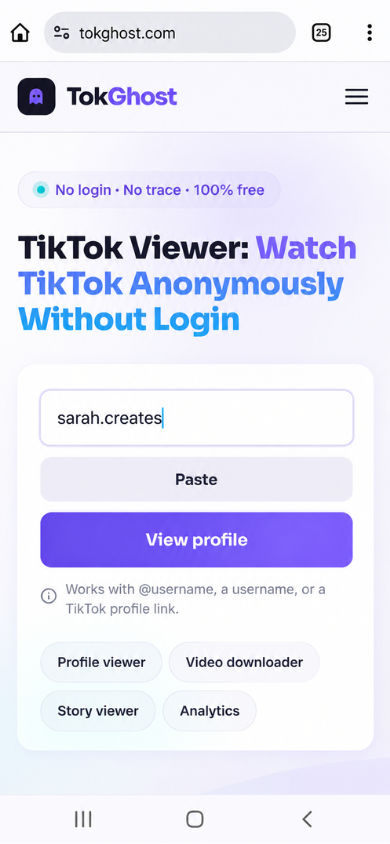
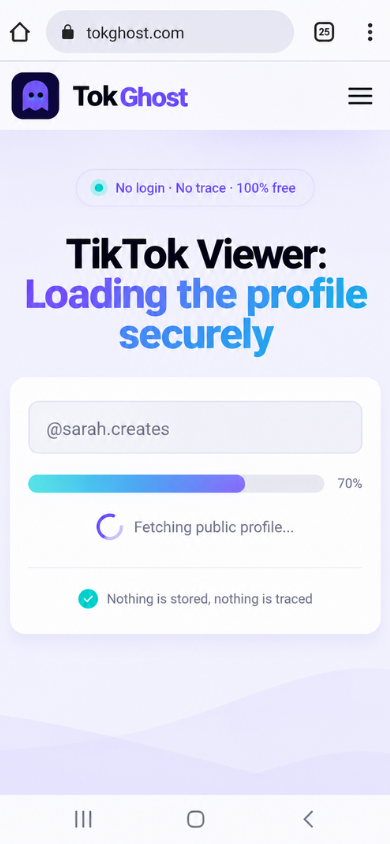
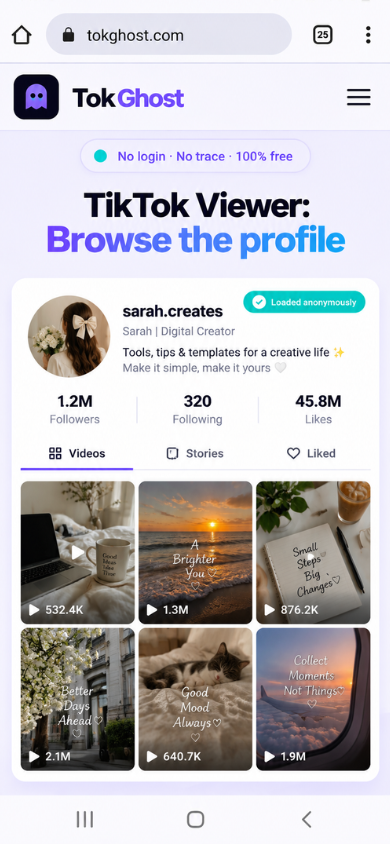
Using TokGhost takes just a few clicks. Simply find a public TikTok username or URL and follow the quick steps below to start watching.
- Open our tool.
- Enter a TikTok username.
- Paste a public TikTok profile URL.
- Click the search button.
- Find a public TikTok profile.
- Browse available TikTok content.
Who Can Use It?
It is useful for anyone who wants to view public TikTok content without using their own account. Here are some of the most common types of users who frequently use this tool:
Content Creators
Creators use it to research public profiles, discover content ideas, and keep an eye on trends within their niche.
Social Media Managers
Social media managers view public TikTok accounts and content when researching competitors, creators, campaigns, or social media trends.
Marketers and Brands
Marketers and brands use it to research public content and understand how creators and competitors are presenting their content.
Researchers and Journalists
Researchers and journalists browse publicly available TikTok profiles and videos when collecting information for social media research or content analysis.
Everyday TikTok Users
Regular users use it when they simply want to watch TikTok without an account or quickly look up a public profile from a browser.
Top Features of TokGhost TikTok Viewer
It combines the most useful features for public TikTok profiles into one simple online tool. These features make profile searches and content viewing faster and more convenient.
Anonymous Profile Viewing
Browse publicly available TikTok profiles without signing into your TikTok account. This makes it useful for users looking for an anonymous viewer online.
Public Video and Content Viewing
View publicly available TikTok videos and other supported content directly through your browser. No separate TikTok app is required.
Story and Repost Viewing
Check supported public Stories and reposts from profiles you search for. Available content depends on what is publicly accessible.
Follower and Following Information
View publicly available follower and following details when they can be accessed. This helps with basic TikTok profile search and research.
Comments and Engagement Details
View available comments and engagement information associated with public content. This helps you understand how users interact with a TikTok video.
Fast TikTok Profile Search
Search for a public TikTok account using its username or profile URL. It keeps the process simple so you can get to the profile you want quickly.
Mobile-Friendly Browser Access
Use it from your phone, tablet, or computer without installing an application. The browser-based viewer makes TikTok browsing convenient across devices.
Is It Safe and Private?
Yes, it is safe to use for browsing publicly available TikTok content. It does not require your TikTok password, login credentials, or personal TikTok account.
You can use it directly from your browser without registration or app installation. It only provides access to public content and does not bypass private TikTok accounts or privacy settings.
TokGhost vs. Traditional TikTok Browsing
| Feature | TokGhost | Traditional TikTok Browsing |
|---|---|---|
| TikTok Account | Not required | Usually required for full access |
| Login | Not required | Required for account-based features |
| Browser Access | Yes | Yes |
| App Installation | Not required | TikTok app may be needed |
| Anonymous Browsing | Yes | Limited |
| Public Profile Search | Yes | Yes |
| Public Content | Available | Available |
| Device Support | Mobile, tablet, and desktop | Mobile and desktop |
Common Problems and Solutions
Sometimes a TikTok profile or video may not load as expected. Here are some common issues you may face while using TokGhost and simple ways to fix them.
TikTok Profile Is Not Found
Check the username for spelling mistakes and make sure the profile URL is correct. The account may also have been renamed, deleted, or made private.
TikTok Video Is Not Loading
Refresh the page and try opening the video again. If it still does not load, the video may have been removed or may no longer be publicly available.
Profile Information Is Missing
Some TikTok profile details may not be publicly available. It can only show information that is accessible from the public profile.
TikTok URL Is Not Working
Make sure you have copied the complete TikTok URL without extra characters or spaces. Try using the TikTok username instead if the link does not work.
Private Profile Cannot Be Viewed
It cannot access content from private TikTok accounts. Only publicly available profiles and content can be viewed.
Viewer Is Not Responding
Refresh the page and check your internet connection before trying again. If the issue continues, try searching for the profile again after some time.
Pros and Cons of TikTok Viewer
It makes public content easier to access without using a TikTok account. However, like any online tool, it has some limitations.
Pros
- No TikTok account required
- No login or registration needed
- Browse public profiles anonymously
- Works on mobile and desktop
- No app installation required
- Quick access to public TikTok content
- Free to use
Cons
- Private TikTok accounts cannot be viewed
- Only publicly available content can be accessed
- Some profiles or videos cannot be loaded
- Removed or unavailable content cannot be displayed
- Some TikTok information cannot be publicly visible
Conclusion
TikTok Viewer makes it easier to view TikTok anonymously without creating an account or logging into TikTok. You can search public profiles, watch videos, Stories, check reposts, and view other available content from your browser.
If you’re looking for a free viewer with no login required, simply enter a TikTok username or profile URL into TokGhost and start exploring anonymously.
Frequently Asked Questions
Is TikTok Viewer Free?
Yes, it is designed as a free Viewer for accessing supported public TikTok content. You do not need a paid TikTok subscription to use the viewer.
Do I Need a TikTok Account to Use It?
No, you do not need a TikTok account to search and browse supported public content through TokGhost.
Can I Watch TikTok Videos Without Logging In?
Yes, supported public TikTok videos can be viewed without logging into a TikTok account. It provides browser-based access to available public content.
Can I View Private TikTok Accounts?
No, you cannot view private TikTok accounts. It only provides access to TikTok profiles and content that are publicly available.
Does It Work on Mobile Devices?
Yes, it is browser-based and can be used on smartphones and tablets as well as desktop computers. You do not need to install a separate app.